The Problem
I was drowning in supplier quotations I couldn't properly read. Different formats. Different languages. German machinery quotes with nested appendices. Czech service offers buried in legal text. Italian HVAC proposals with pricing structures that made no sense without context.
Every quotation required the same mental process: extract the key commercial terms, identify what's missing, flag risks, and figure out the negotiation levers. The analysis itself isn't hard — it's just repetitive, time-consuming, and easy to rush when you're reviewing your fifteenth PDF that week.
What I wanted was simple: drop a PDF into a folder, and get a procurement-ready analysis back. No switching apps. No copy-pasting into ChatGPT. No formatting the output for my manager.
The Solution: 3 Steps in Power Automate
The entire flow has exactly three components. That's it. Here's what each one does:
Step 1: Trigger — "When a file is created in a folder"
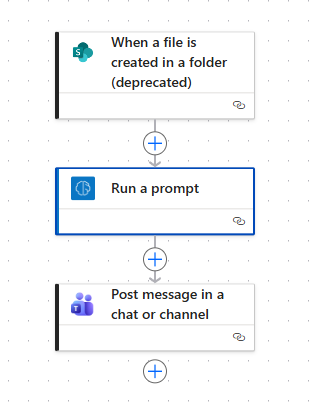
Point this to a SharePoint folder (or OneDrive). Whenever anyone drops a PDF into that folder, the flow fires automatically. No buttons to click, no forms to fill out. Just drag and drop.
You can set this up for your whole team — one shared folder, multiple buyers dropping quotes in, everyone getting structured analysis back.
Step 2: AI Analysis — "Run a prompt"
This is where the magic happens. Power Automate's "Run a prompt" action sends the uploaded document to an AI model (GPT-3.5 via Azure, included in your Microsoft license) along with your custom instructions.
The prompt is the most important part of the entire setup. It tells the AI exactly how to think like a procurement professional. Mine assigns the AI a role — a senior procurement expert who evaluates quotations against specific criteria. Here's the structure I use:
Task — when a document is uploaded, perform:
1. Document Summary — table format with supplier, price, terms, lead time, score
2. Evaluation Table — score 8 areas (price transparency, TCO, technical specs, payment terms, compliance, delivery, risk, ESG) each x/10 with comments
3. Deviation Highlights — flag anything that deviates from procurement best practices
4. Three Negotiation Strategies — Conservative (essentials), Balanced (value enhancers), Progressive (turn offer into advantage)
5. Executive Summary — is this approval-ready or does it need rework?
Rules: Score based on content present, not assumptions. Don't hallucinate missing data. List what's missing explicitly.
Because this runs on GPT-3.5 (older model through Azure), you need to be very specific in your prompt. With newer models like GPT-4 or Claude, you could be vaguer and still get great results. With 3.5, precision in instructions is everything — which is actually a good discipline for any prompt engineer.
The output arrives in under two minutes. Structured tables, scores, negotiation tactics — ready to forward to your manager or paste into an approval workflow.
Step 3: Delivery — "Post message in a chat or channel"
The final step sends the AI analysis to Microsoft Teams — either to a specific channel (e.g., #procurement-reviews) or directly to you as a private message. The analysis appears formatted and ready to read, right where your team already works.
No new app to open. No email to forward. The analysis meets you where you already are.
What the Output Looks Like
For every quotation, you get a structured evaluation covering eight procurement-critical areas. Each area gets a score out of 10 and a specific comment about what's present, what's missing, and what's risky.
The areas evaluated are: Price Transparency (are costs detailed including Incoterms?), Total Cost of Ownership (are long-term costs included?), Technical Specifications (are specs clear and sufficient?), Contractual & Payment Terms (are payment terms balanced?), Compliance & Standards (CE marking, EHS, safety?), Delivery & Logistics (Incoterms, shipping, insurance?), Risk & Responsibility (liabilities covered?), and Sustainability & ESG (any green factors mentioned?).
Then you get three negotiation strategies — from conservative essentials to progressive tactics that can turn a mediocre offer into a strategic advantage. This is where the real value lives: instead of just reading the quote, you get actionable next steps for the negotiation.
"The most important part is not the flow itself — it's the prompt. For me, this is where AI really shines: when there's too much unstructured data and I need clarity, not creativity."
What You Can Add Later
This three-step flow is the starting point. Once your team starts using it and trusting the output, you can extend it with storing quotations in a SharePoint list for comparison, comparing similar offers side by side, extracting pricing structures into Excel for benchmarking, and routing high-value quotes to a manager for approval automatically.
But first, you need something people actually use. Everything else comes later.
Results
What used to take 15–30 minutes of focused reading, highlighting, and note-taking per quotation now takes under two minutes — and the output is more consistent than manual review. The AI doesn't get tired on the fifteenth PDF. It doesn't skip the ESG check because it's Friday afternoon. It applies the same rigorous framework every single time.
The whole thing took less than 10 minutes to build. The real investment was crafting the prompt — understanding what a good procurement analysis actually needs to cover, and translating that into clear instructions for the model.
If your company has Microsoft 365, you can build this right now. No IT ticket. No vendor evaluation. No budget. Just Power Automate, a SharePoint folder, and a well-written prompt.